Online JSON Editors Struggle with 20MB Base64: Benchmark Results
Published April 23, 2026 · 6 min read
When searching for an online JSON editor to parse API responses, you expect it to load instantly. But when your data includes a 20MB Base64 image string from a modern AI or multimedia API, almost every tool slows to a crawl. Response times balloon, scrolling becomes sluggish, and the editor becomes nearly unusable.
Why does this happen? Is it a lack of hardware power, or a fundamental flaw in how web browsers process text? We decided to run a transparent benchmark using a high-end desktop machine to find out exactly why top formatting tools fail under pressure, and how to fix it.
The 20MB Benchmark: Top Online JSON Editors Tested
To eliminate hardware limitations as an excuse, we ran our benchmark on a flagship developer machine:
- CPU: Intel Core i7-14700F
- Memory: 32GB RAM
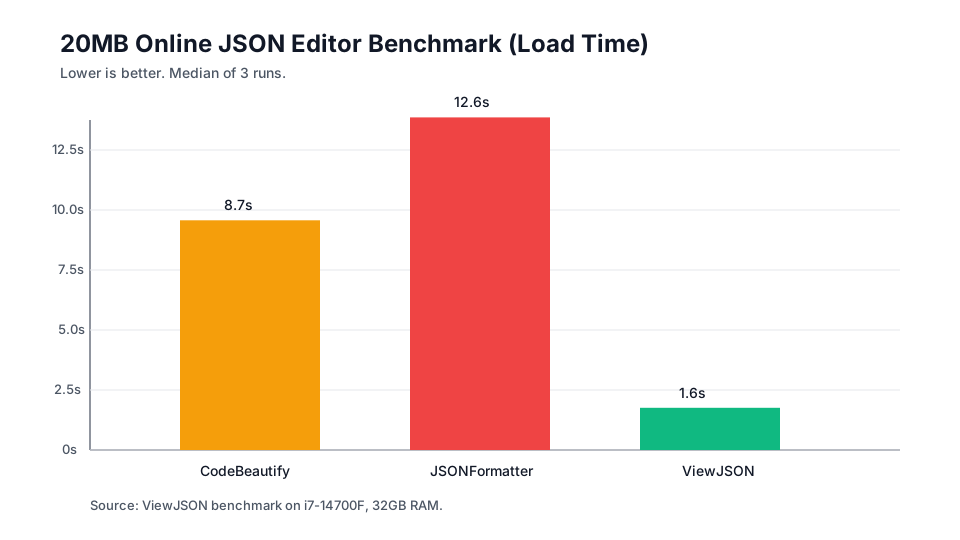
We used a Playwright script to simulate pasting payloads from 1MB to 20MB into the most popular online formatting tools. You can reproduce or adapt the benchmark using the script on GitHub Gist. Here are the real-world results, focusing on Load time (with Format and Minify times in parentheses):
| File Size | CodeBeautify | JSONFormatter | ViewJSON |
|---|---|---|---|
| 1MB | 1.1s(F: 1.1s, M: 1.0s) | 1.2s(F: 0.9s, M: 1.0s) | 0.7s(F: 0.6s, M: 0.6s) |
| 5MB | 2.5s(F: 4.1s, M: 3.1s) | 4.3s(F: 3.0s, M: 3.8s) | 0.9s(F: 0.7s, M: 0.7s) |
| 10MB | 4.3s(F: 7.8s, M: 6.4s) | 5.9s(F: 5.2s, M: 6.9s) | 1.1s(F: 0.8s, M: 0.7s) |
| 20MB | 8.7s(F: 16.0s, M: 13.1s) | 12.6s(F: 15.4s, M: 11.6s) | 1.6s(F: 1.0s, M: 0.8s) |
* F = Format Time, M = Minify Time. Data represents the median of 3 runs. Primary-colored figures indicate load time. Times rounded to one decimal second.
Why Do Online JSON Editors Slow Down on Large Base64 Strings?
The massive performance gap highlights a severe limitation in how traditional web applications handle code highlighting. When an online JSON editor slows down on large Base64 data, two primary bottlenecks are at play:
1. The Single-Threaded CPU Bottleneck
JavaScript execution in the browser is single-threaded. When a traditional formatter receives a 20MB file, it runs an extremely heavy syntax tokenization and layout loop on the main thread. Because it cannot distribute this work across multiple CPU cores, even a modern CPU like the i7-14700F is barely utilized. One core runs at 100% capacity, blocking the entire page from responding to clicks or scrolling.
2. The Mega-Line Rendering Bottleneck
When processing a JSON file, a syntax highlighter wraps the entire Base64 string into just a single <span class="string"> node. The real bottleneck is that this single node contains roughly 27 million characters, and all crammed on one continuous line with no line breaks. The editor's core engine must measure character widths, calculate line wrapping, and position the cursor for this mega-line. For an unbroken string of this magnitude, these layout calculations trigger catastrophic memory overhead that completely locks up the browser's Main Thread.
The ViewJSON Solution: Media Replacement and Lossless Clipboard
Traditional editors freeze because they try to render tens of millions of characters for a human to read. But we realized a fundamental truth: no human reads 20MB of Base64 gibberish; they want to see the actual media behind it. Instead of brute-forcing the browser's limits, ViewJSON implements a UX-driven architectural workaround:
- Media Replacement (Not Just Truncation): When ViewJSON detects a Base64 string, it decodes the magic bytes and completely replaces the unreadable code block with an actual inline media preview (like an image). If the media preview is toggled off, it intelligently truncates the string. In both cases, by preventing millions of characters from entering the editor's text buffer, the core engine and rendering thread are completely relieved of their calculation burden.
- Lossless Clipboard Recovery: Hiding the original text usually creates a problem: if you copy the JSON, you lose the data. ViewJSON solves this with a custom clipboard manager. Even if you are looking at an image preview or a truncated string, when you click "Copy", the editor silently restores the hidden, original Base64 payload in the background, ensuring your copied data remains 100% intact.
This combination of rendering evasion and data integrity allows ViewJSON to format 20MB payloads in under two seconds.
Related Article
How to Debug Base64 Images in JSON API Responses →Stop Waiting on a Slow JSON Editor
Paste your massive JSON responses directly into ViewJSON. Experience instant formatting, inline media previews, and zero slowdowns.
Open ViewJSON →