Online JSON Editors Struggle with 20MB Base64: Benchmark Results
Published April 23, 2026 · 6 min read
When an API response contains a 20MB Base64 image string, browser editors may spend significant time parsing, highlighting, and laying out the payload. The impact varies with the editor implementation, browser, device, and test data, so a controlled comparison is more useful than a claim about every tool.
We ran a controlled comparison on one desktop configuration to separate editor behavior from the test machine. The results below describe these three sites and this test method; they are not a universal ranking of online JSON editors.
The 20MB Benchmark: Three Online JSON Editors Tested
The benchmark used the following desktop configuration:
- CPU: Intel Core i7-14700F
- Memory: 32GB RAM
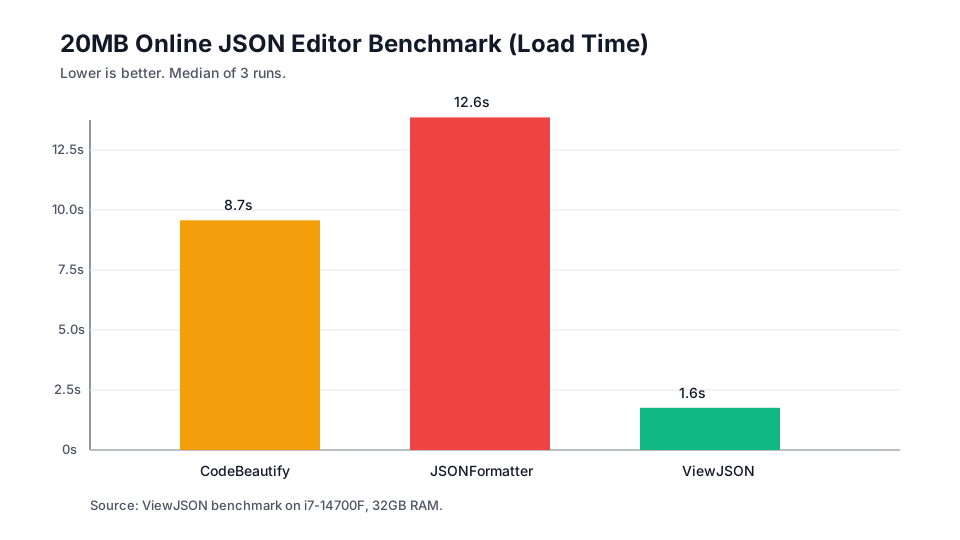
A Playwright script simulated pasting payloads from 1MB to 20MB into CodeBeautify, JSONFormatter, and ViewJSON. You can reproduce or adapt the benchmark script on GitHub Gist. The table reports the median of three runs for this setup, with load time first and format/minify timings in parentheses:
Download the raw CSV. The runner recorded action timings and failures, but not the OS, Chromium, Playwright, network, or tested site build versions. Treat these results as a dated snapshot, not a permanent ranking.
| File Size | CodeBeautify | JSONFormatter | ViewJSON |
|---|---|---|---|
| 1MB | 1.1s(F: 1.1s, M: 1.0s) | 1.2s(F: 0.9s, M: 1.0s) | 0.7s(F: 0.6s, M: 0.6s) |
| 5MB | 2.5s(F: 4.1s, M: 3.1s) | 4.3s(F: 3.0s, M: 3.8s) | 0.9s(F: 0.7s, M: 0.7s) |
| 10MB | 4.3s(F: 7.8s, M: 6.4s) | 5.9s(F: 5.2s, M: 6.9s) | 1.1s(F: 0.8s, M: 0.7s) |
| 20MB | 8.7s(F: 16.0s, M: 13.1s) | 12.6s(F: 15.4s, M: 11.6s) | 1.6s(F: 1.0s, M: 0.8s) |
* F = Format Time, M = Minify Time. Data represents the median of 3 runs. Primary-colored figures indicate load time. Times rounded to one decimal second.
Why Do Online JSON Editors Slow Down on Large Base64 Strings?
The measured gap is consistent with several possible costs in a browser editor. Parsing, syntax highlighting, layout, and application-specific media handling can all contribute, and the dominant bottleneck depends on the implementation:
1. The Single-Threaded CPU Bottleneck
Many editor operations still run on the main thread, so parsing or tokenizing a large document can delay input and scrolling. Workers can move selected work off the main thread, but not every editor uses them, and the exact CPU profile must be measured rather than assumed.
2. The Mega-Line Rendering Bottleneck
A 20MB binary payload represented as Base64 is roughly 27MB of text before JSON and editor overhead. If an editor keeps that value as one long line, its layout and selection model may become expensive. Whether this causes a freeze depends on the editor and browser, so the benchmark should be read as an observed result rather than a universal rendering explanation.
The ViewJSON Solution: Media Replacement and Lossless Clipboard
Rendering tens of millions of characters creates unnecessary work when the developer's goal is to inspect the media represented by a Base64 value. ViewJSON uses a UX-oriented approach: the preview is useful evidence, while the original value remains available for copying.
- Media Replacement (Not Just Truncation): When ViewJSON detects a supported Base64 media value, it reads the header bytes and can show an inline preview instead of rendering the full unreadable value. If the preview is toggled off, it shows a truncated representation while retaining the original value for recovery. This can reduce rendering work, but the document and preview still consume memory.
- Lossless Clipboard Recovery: Hiding the original text can create a data-integrity problem if copying returns only the preview. ViewJSON's clipboard manager restores the stored original Base64 value when you click "Copy", subject to the current document state and browser clipboard permissions.
In this benchmark configuration, the combination of media replacement and lossless clipboard recovery allowed ViewJSON to load the 20MB case in about 1.6 seconds. Other payloads, browsers, or devices may produce different results.
Related Article
How to Debug Base64 Images in JSON API Responses →Stop Waiting on a Slow JSON Editor
Paste a large JSON response into ViewJSON and compare its behavior with your own browser and payload. Large documents still consume memory, so test production-sized data before relying on a timing claim.
Open ViewJSON →